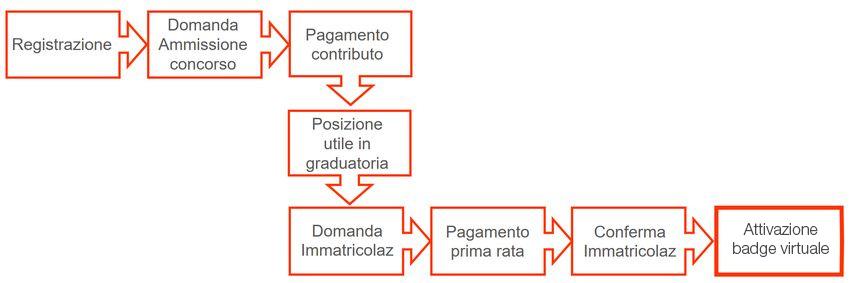
To apply for a Master’s degree programme with a limited-entry, i.e. one with a maximum number of places available, applicants must follow the application procedures and deadlines set out in the individual admission notices, which should be read carefully. The call for applications is the official document to be consulted for information on the number of places available, the procedures for registering for the selection test, the type of test, the relevant deadlines, and the enrolment requirements and timelines.
For students holding an Italian qualification, the enrolment procedure is carried out entirely online and consists of the steps outlined below. Applicants holding a foreign qualification must contact theRegistrar’s Office of the programme they wish to apply for in order to have their qualifications assessed.
Further information on the enrolment procedure for applicants with a foreign qualification.
The procedure consists of the following steps:
1. Registration for online services
Registration is completed via the website www.esse3.unimore.it using SPID – the Public Digital Identity System. If you do not have SPID credentials, request them immediately.
SPID will always be required for future access. Exceptions are made for those who do not hold an Italian document or are minors, who, being without SPID, must proceed with registration. At the end of the registration process, personal UniMORE credentials will be issued for access to the individual restricted area. Record your credentials and keep them for future access.
» Registration Guide
(*) Those who have previously been UniMORE students are already registered and in possession of access credentials for Esse3.
2. Submission of the application for admission
Within the deadlines set out in the call for applications, visit the website www.esse3.unimore.it, select “Login” from the menu at the top right, and access the Restricted Area using SPID or your personal credentials. Select “Student Area” and then “Admission”, choose the degree programme, and follow the on-screen instructions. Enter the required information and upload the necessary documents. At the end, select “TAXES” (Fees) from the Esse3 menu to pay the invoice for the contribution via the PagoPA system.
3. Payment of fees
Make the non-refundable payment of the fees via the PagoPA system by the deadline indicated in the call for applications. According to AgID (www.agid.gov.it) instructions, for both means of payment (online or via payment at authorised offices), the payment amount could be transferred on the day following the payment request, thus precluding the enrolment. Late payment will result in exclusion from the ranking list. Further information on the means of payment.
4. Online enrolment application
Those who are placed in a successful position on the ranking list may proceed with the enrolment application. Go to the website www.esse3.unimore.it , select “Login” from the menu at the top right, and access the Restricted Area using SPID or your personal credentials.
Select “Student Area”, then “Admission”, followed by “Enrolment in limited-entry programmes”, choose the degree programme, and follow the on-screen instructions. Enter the required information and upload the necessary documents. Once the procedure is completed, you can view the enrolment confirmation slip.
» List of required documents
» Enrolment guide
5. Payment
To make the payment of the first instalment of the university fees, select “TAXES” (fees) from the Esse3 menu. Select the invoice to be paid and proceed with the payment via the PagoPA system. According to AgID (www.agid.gov.it) instructions, for both means of payment (online or via payment at authorised offices), the payment amount could be transferred on the day following the payment request, thus precluding the enrolment. Late payment will prevent enrolment. Further information on the means of payment.
6. Enrolment confirmation
Filling in the enrolment application and paying the tuition fee only lead to a conditional enrolment that will become final only after the checks by the offices in charge have been carried out successfully. For any outstanding elements to be verified in relation to the application submitted, students will be invited by email (sent to their personal address) to regularise their position.
The enrolment is final 15 days following the payment date if no email is received.
7. Digital badge activation and personal email account setup:
If 15 days have passed since the payment of the first instalment without receiving any email, your enrolment is considered final. If you registered using SPID, the digital badge will be activated automatically. If, on the other hand, you obtained your Esse3 credentials because you do not have SPID, you must go to the Registrar’s Office to activate your card.
For further information, see: Digital badge
Each student will be provided with a personal email account in the @studenti.unimore.it domain for institutional communications with the University.
- Frequently Asked Questions (FAQs)
FAQs - Operating guides
Please refer to the section “Guides for online procedures” - Technical issues
For any technical issues with the online procedures, please contact: webhelp@unimore.it - Please contact Informastudenti for information on:
Guidance on choosing Unimore degree programmes: visit the website
https://poa.unimore.it/informastudenti/
- Enrolment procedure if you have an Italian qualification and are an EU (wherever resident)
or non-EU resident applicant
- Please contact the Registrar’s Office of the degree programme you wish to apply for
regarding:
- Calls for applications for access to programmes
- Enrolment procedures for applicants with a foreign qualification.